
R&D III Department.Tom Chen
In injection molding, final part quality is shaped by multiple factors, including product design, mold design, material properties, and processing conditions. Finding the best way to improve quality, cut costs, and shorten development time has long been a key challenge. Traditionally, manufacturers relied on trial and error, an approach that is often limited by time and resources.
Statistical methods such as Design of Experiments (DOE) made it possible to search for optimal solutions more systematically, reducing unnecessary trials and improving accuracy. Advances in Artificial Intelligence (AI) have also opened up new possibilities for optimization — by learning from data and making predictions, AI can further improve analysis speed and accuracy in certain scenarios.
Moldex3D 2026 focuses on three pillars: Automation, Optimization, and Intelligence. Through automated workflows, DOE, and AI technology, Moldex3D connects analysis, data management, and optimization to improve the efficiency and accuracy of molding simulation. Moldex3D Studio lets users perform both injection molding simulation and optimization analysis on a single platform. The DOE Wizard in Studio already brings a more scientific approach to mold trials. This year, Moldex3D introduces the AI Optimization Wizard, which integrates CAE simulation with AI-driven iteration. The feature runs the entire iterative process automatically, without manual intervention, helping users find optimal design solutions more efficiently.
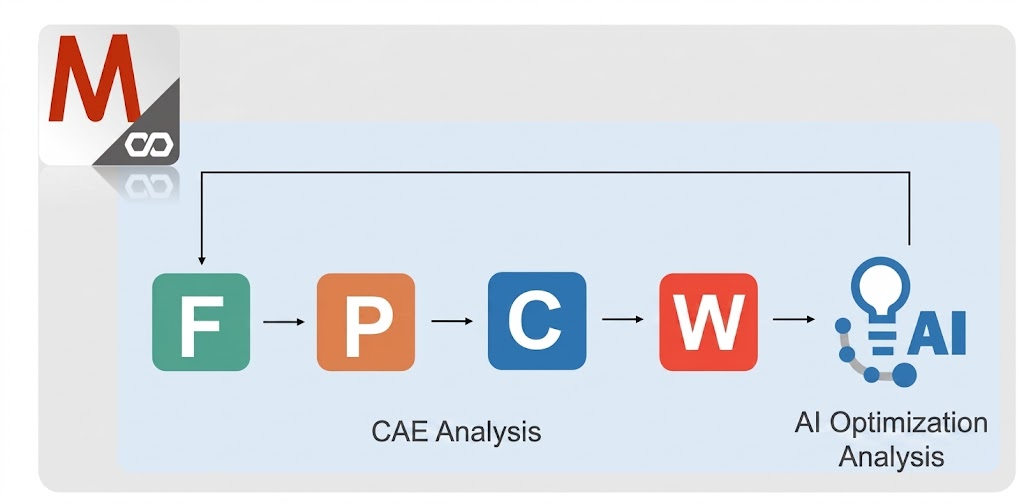
Fig. 1 Users can perform both injection molding simulation and optimization analysis in Studio.
Different Optimization Strategies: DOE and AI
DOE and AI take different approaches to optimization problems. DOE uses Taguchi orthogonal arrays to define the experimental design, with control factors set at discrete levels. This enables a systematic, statistically grounded analysis that effectively identifies the most influential factors and produces reliable conclusions.
AI optimization, by contrast, treats control factors as continuous ranges. It learns from data to iteratively search for optimal solutions within those ranges, and it can also incorporate constraints. Because it learns from intermediate results and adjusts its search direction dynamically, it is particularly well suited to cases where the best parameter combination isn’t yet known. It gradually narrows its search to the most promising parameter regions and provides multiple feasible solutions, giving users more options to choose from.
Imagine a beginner baker who wants to quickly find the best baking temperature, mixing time, and baking time for a cake. As the data in Figure 2 shows, DOE systematically tests different combinations. It keeps running trials even in ranges that produce poor results, such as multiple trials at higher temperatures like 185.6°C and 200°C, in order to understand how each parameter affects the outcome. AI optimization, by contrast, quickly identifies 160-170°C as a promising temperature range. It then focuses its trials on mixing and baking times, reaching a better solution efficiently.
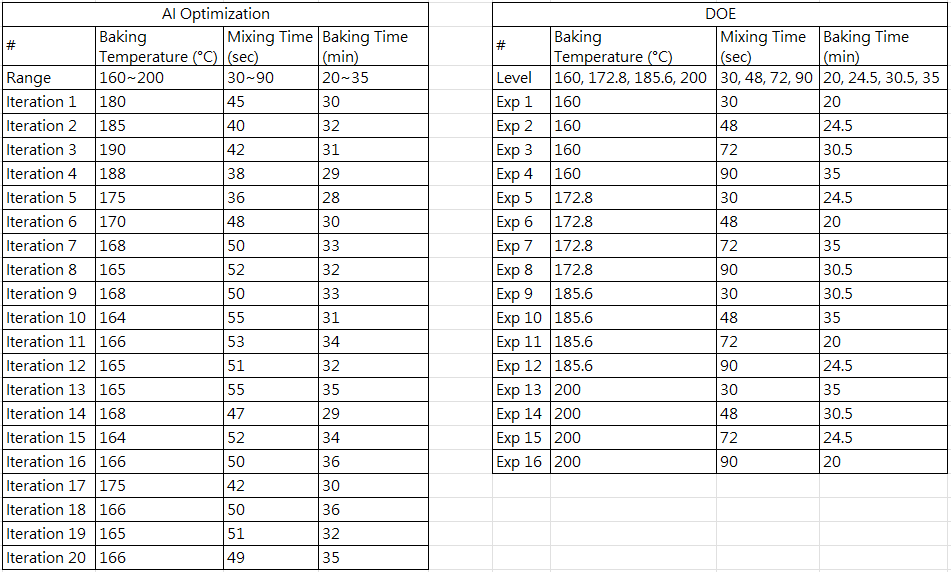 Fig. 2 DOE determines static experimental runs from an orthogonal array, while AI optimization adjusts the runs dynamically.
However, if the existing data is insufficient, AI optimization may produce less reliable results. Imagine a company optimizing its production process for mechanical parts. The company has identified three key factors: production rate, material density, and machine wear. As shown in Figure 3, DOE enables the company to quickly find the optimal combination and systematically determine that production rate is the most influential factor. Under the same time and resource constraints, the AI results were still fluctuating across different ranges after about ten iterations because the data had not fully converged. As a result, no stable conclusion could be drawn. This illustrates that AI optimization can be less stable than DOE when data is limited.
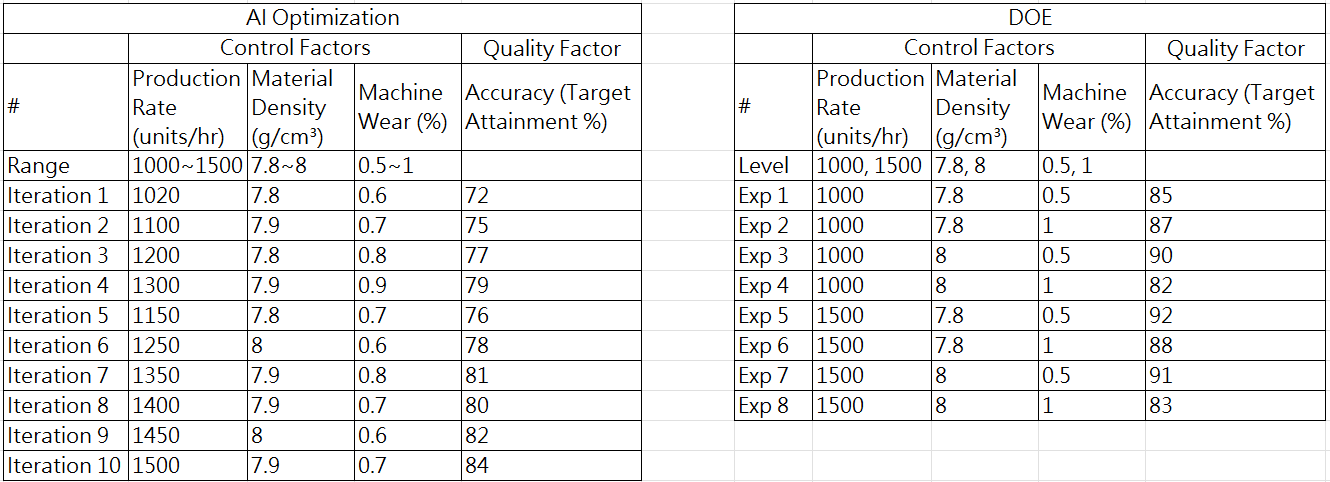 Fig. 3 Comparison of DOE and AI optimization results with insufficient data.
Moldex3D Studio: AI Optimization Wizard
Moldex3D introduces the AI Optimization Wizard, which allows users to create an optimization iteration run by configuring control factors and quality factors and setting the maximum number of iterations. Once submitted for analysis, the Computing Manager automatically completes the entire CAE iteration process. Users can then review the AI optimization results in Studio to identify the optimal solution.
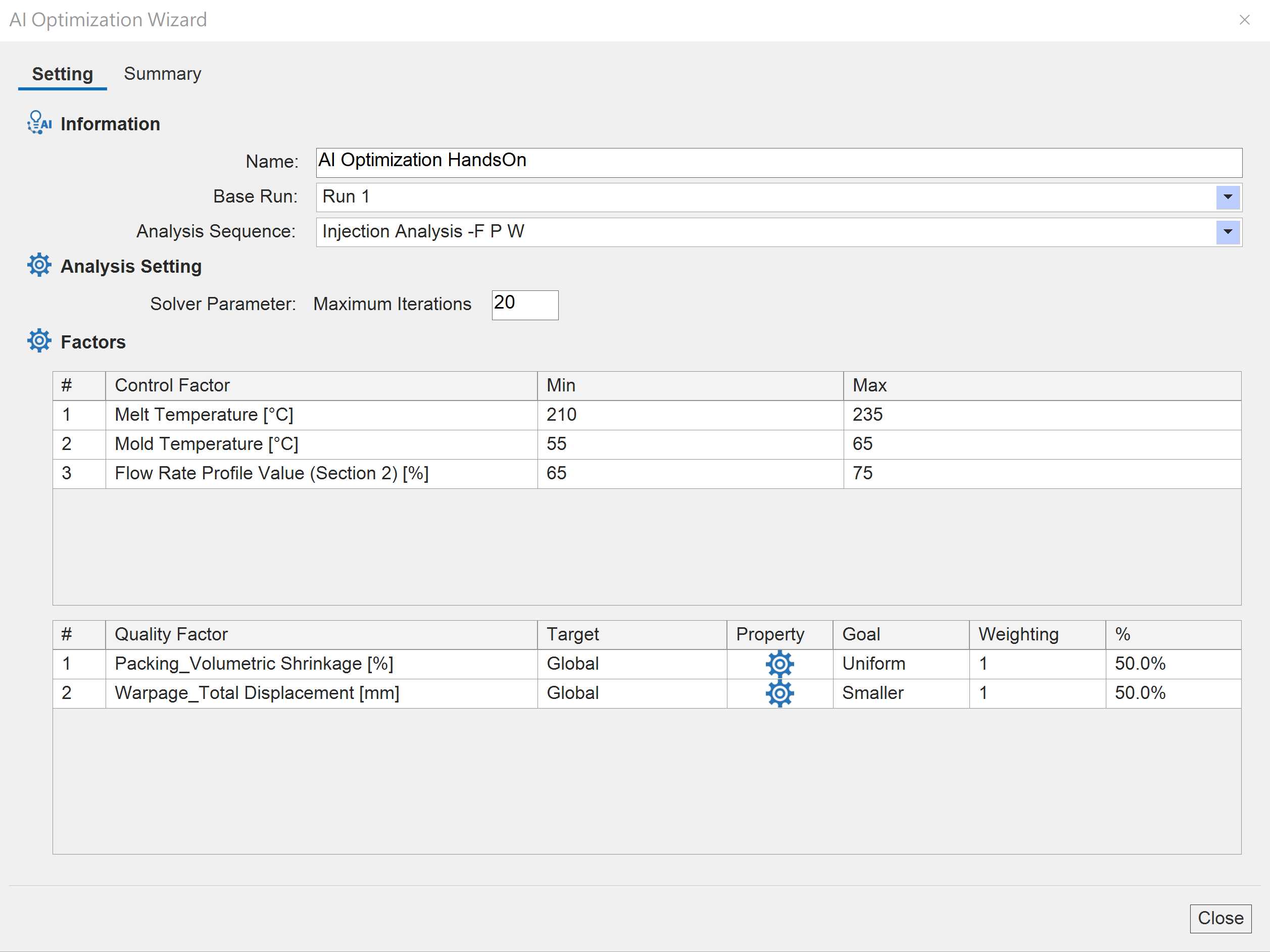
Fig. 4 AI Optimization Wizard.
The iteration curves of the control factors and quality factors show whether the factors are trending toward convergence and whether the most promising range is gradually taking shape. Next, the iteration table helps users find the best iteration and see which iterations lie on the Pareto front. This supports trade-off decisions and the selection of feasible solutions in multi-objective optimization. Because AI optimization does not perform a comprehensive exploration, it cannot provide complete statistical information the way DOE does. However, users can still observe and uncover potential relationships between factors through a parallel coordinates plot.
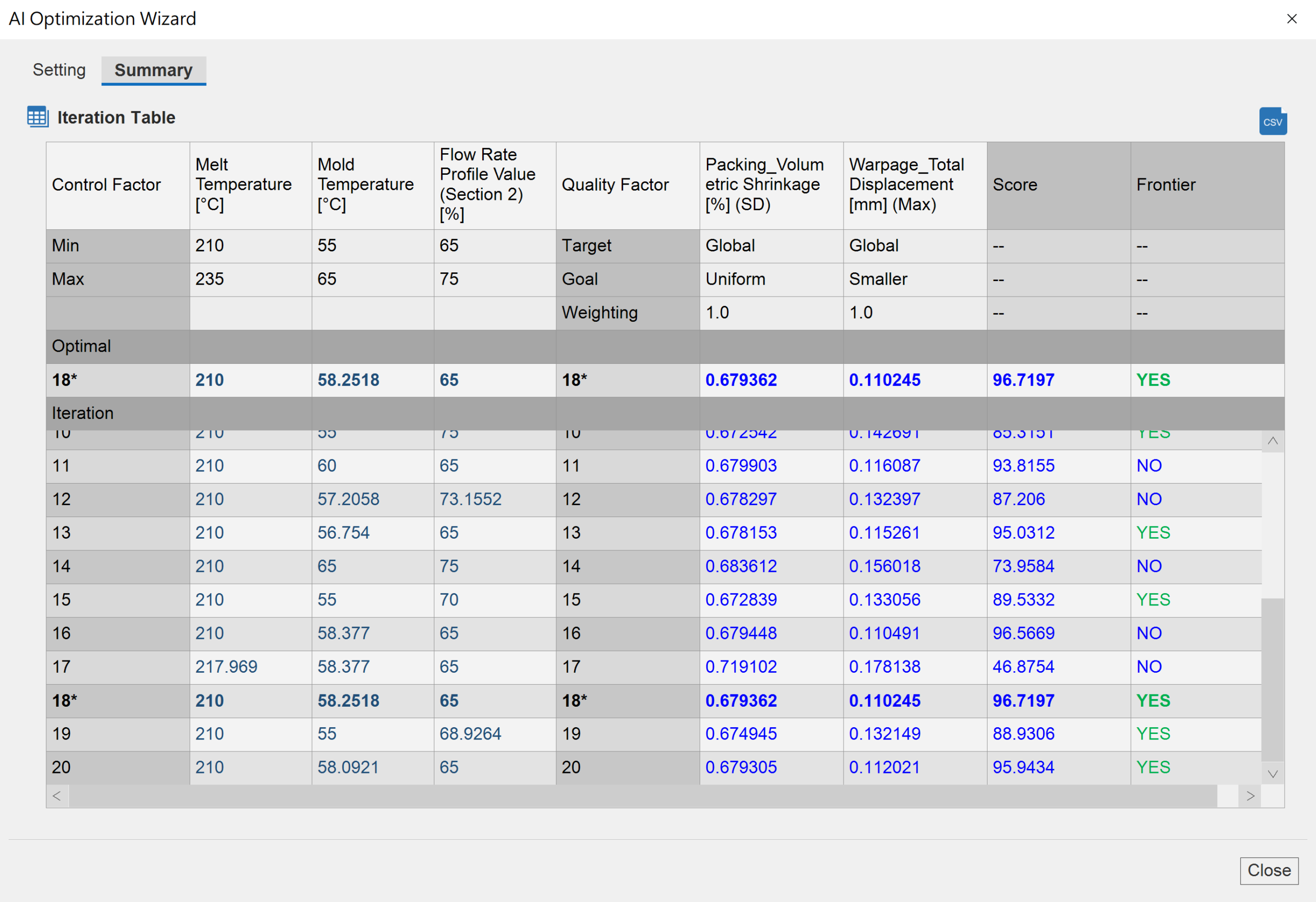
Fig. 5 The iteration table summarizes control factor and quality factor data throughout the iteration process and provides Pareto front information.
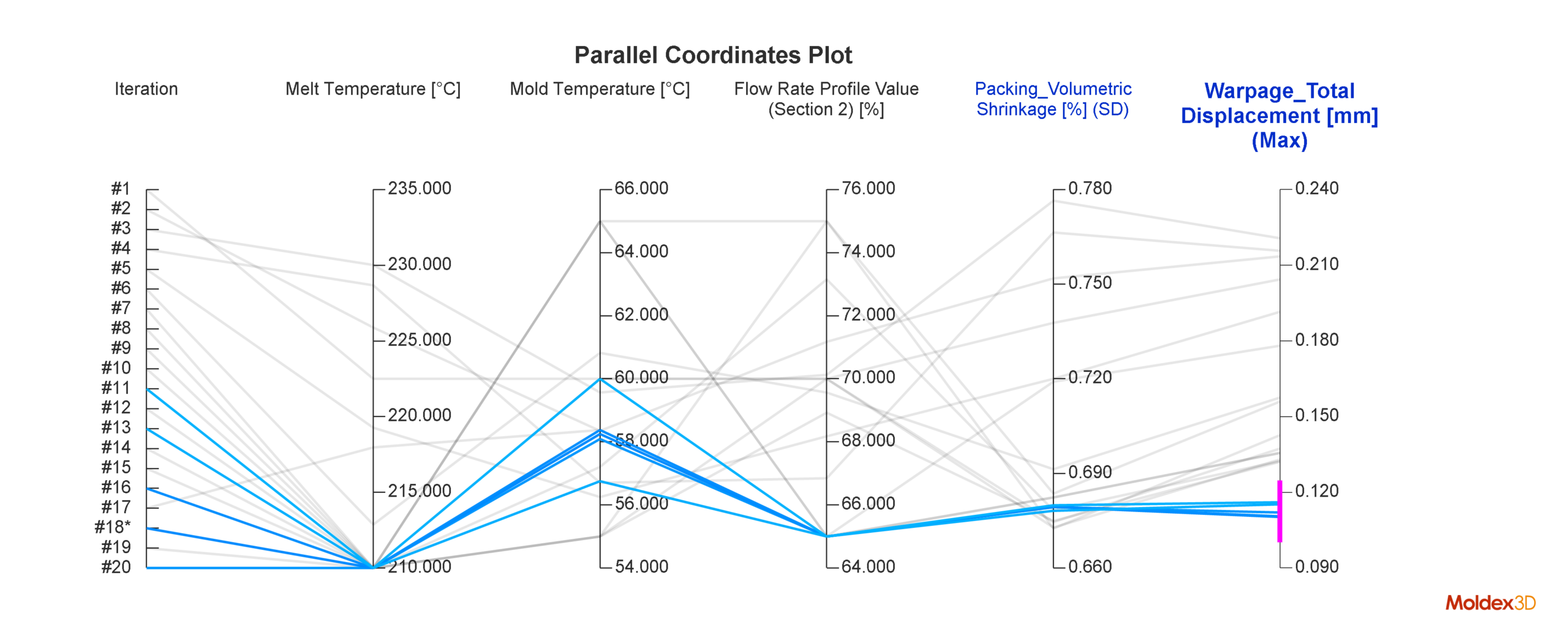 Fig. 6 Users can gain insight into correlations between factors through a parallel coordinates plot.
Flexible Optimization Approaches for Better Decision-Making
When time and resources are limited, users can choose an optimization method based on how much they already know about the process and what kind of result they need. DOE examines each factor in detail and shows how it influences the results. AI optimization goes further by progressively focusing on the most promising parameter regions in its search for optimal solutions. For complex optimization problems, Moldex3D Studio offers different approaches. Users can combine the DOE Wizard with the AI Optimization Wizard as needed to balance efficiency and accuracy and make more reliable decisions.